|
|

Desktop Wallpaper
Free from BHM
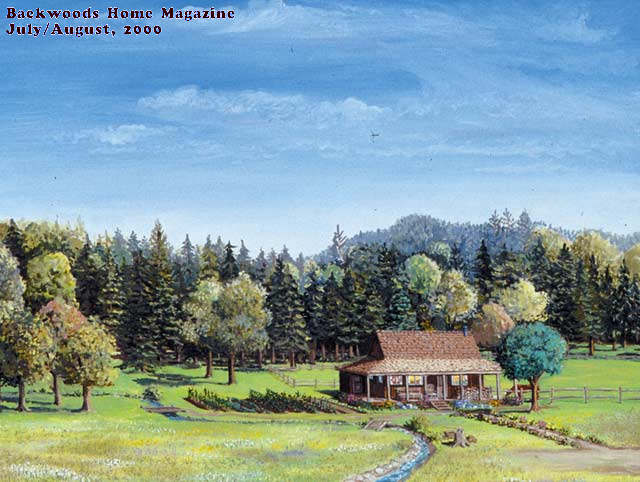
One of the most popular features of Backwoods Home Magazine has always been the amazing artwork on the cover of each issue. Now this artwork is available free, as wallpaper for your computer monitor.
Terms of Use
The images are free for personal use, subject to the following restrictions:
- The Backwoods Home Magazine name and issue information must remain in the upper left hand corner of the images.
- Images may not be cropped, framed, or changed in any manner.
- If you give the image(s) to anyone, or distribute them in any manner, you may not charge any fee of any kind for anything.
No image, in whole or in part, or group of images, modified or not, may be used for any commercial purpose without express written permission from Backwoods Home Magazine.
Instructions
Click on the file size of the selection you want. When it has finished loading in your browser window you may either set it as wallpaper or save it to your hard drive
To set as wallpaper on a Windows computer: Right click on the image. Select Set as Wallpaper, Set as Desktop Background, or something similar.
To Save: Right click on the image. Select Save Image As or Save Picture As. When the dialog window opens, browse to the folder in which you want to store the picture, then click on Save
Currently Available Wallpaper
| |
Available for these monitor settings.
Click on the screen size to preview or capture the picture.
|
 |
Mar/Apr, 2012 |
1920 x 1200 |
1680 x 1050 |
1600 x 1200 |
1440 x 900 |
1400 x 1050 |
1280 x 1024 |
| 1280 x 960 |
1280 x 800 |
1280 x 768 |
1152 x 864 |
1024 x 768 |
800 x 600 |
| |
 |
Jan/Feb, 2012 |
1920 x 1200 |
1680 x 1050 |
1600 x 1200 |
1440 x 900 |
1400 x 1050 |
1280 x 1024 |
| 1280 x 960 |
1280 x 800 |
1280 x 768 |
1152 x 864 |
1024 x 768 |
800 x 600 |
| |
 |
Nov/Dec, 2011 |
1920 x 1200 |
1680 x 1050 |
1600 x 1200 |
1440 x 900 |
1400 x 1050 |
1280 x 1024 |
| 1280 x 960 |
1280 x 800 |
1280 x 768 |
1152 x 864 |
1024 x 768 |
800 x 600 |
| |
 |
Sept/Oct, 2011 |
1920 x 1200 |
1680 x 1050 |
1600 x 1200 |
1440 x 900 |
1400 x 1050 |
1280 x 1024 |
| 1280 x 960 |
1280 x 800 |
1280 x 768 |
1152 x 864 |
1024 x 768 |
800 x 600 |
| |
 |
Mar/Apr, 2008 |
1920 x 1200 |
1680 x 1050 |
1600 x 1200 |
1440 x 900 |
1400 x 1050 |
1280 x 1024 |
| 1280 x 960 |
1280 x 800 |
1280 x 768 |
1152 x 864 |
1024 x 768 |
800 x 600 |
| |
 |
Jan/Feb, 2008 |
1920 x 1200 |
1680 x 1050 |
1600 x 1200 |
1440 x 900 |
1400 x 1050 |
1280 x 1024 |
| 1280 x 960 |
1280 x 800 |
1280 x 768 |
1152 x 864 |
1024 x 768 |
800 x 600 |
| |
 |
Sep/Oct, 2007 |
1920 x 1200 |
1680 x 1050 |
1600 x 1200 |
1440 x 900 |
1400 x 1050 |
1280 x 1024 |
| 1280 x 960 |
1280 x 800 |
1280 x 768 |
1152 x 864 |
1024 x 768 |
800 x 600 |
| |
 |
May/Jun, 2007 |
1920 x 1200 |
1680 x 1050 |
1600 x 1200 |
1440 x 900 |
1400 x 1050 |
1280 x 1024 |
| 1280 x 960 |
1280 x 800 |
1280 x 768 |
1152 x 864 |
1024 x 768 |
800 x 600 |
| |
 |
May/Jun, 2007< |
1920 x 1200 |
1680 x 1050 |
1600 x 1200 |
1440 x 900 |
1400 x 1050 |
1280 x 1024 |
| 1280 x 960 |
1280 x 800 |
1280 x 768 |
1152 x 864 |
1024 x 768 |
800 x 600 |
| |
 |
Mar/Apr, 2007 |
1920 x 1200 |
1680 x 1050 |
1600 x 1200 |
1440 x 900 |
1400 x 1050 |
1280 x 1024 |
| 1280 x 960 |
1280 x 800 |
1280 x 768 |
1152 x 864 |
1024 x 768 |
800 x 600 |
| |
 |
Mar/Apr, 2007 |
1920 x 1200 |
1680 x 1050 |
1600 x 1200 |
1440 x 900 |
1400 x 1050 |
1280 x 1024 |
| 1280 x 960 |
1280 x 800 |
1280 x 768 |
1152 x 864 |
1024 x 768 |
800 x 600 |
| |
 |
Jan/Feb, 2007 |
1920 x 1200 |
1680 x 1050 |
1600 x 1200 |
1440 x 900 |
1400 x 1050 |
1280 x 1024 |
| 1280 x 960 |
1280 x 800 |
1280 x 768 |
1152 x 864 |
1024 x 768 |
800 x 600 |
| |
 |
Sept/Oct, 2006 |
1920 x 1200 |
1680 x 1050 |
1600 x 1200 |
1440 x 900 |
1400 x 1050 |
1280 x 1024 |
| 1280 x 960 |
1280 x 800 |
1280 x 768 |
1152 x 864 |
1024 x 768 |
800 x 600 |
| |
 |
May/Jun, 2006 |
1920 x 1200 |
1680 x 1050 |
1600 x 1200 |
1440 x 900 |
1400 x 1050 |
1280 x 1024 |
| 1280 x 960 |
1280 x 800 |
1280 x 768 |
1152 x 864 |
1024 x 768 |
800 x 600 |
| |
 |
Mar/Apr, 2006 |
1920 x 1200 |
1680 x 1050 |
1600 x 1200 |
1440 x 900 |
1400 x 1050 |
1280 x 1024 |
| 1280 x 960 |
1280 x 800 |
1280 x 768 |
1152 x 864 |
1024 x 768 |
800 x 600 |
| |
| |
Available for these monitor settings.
Click on the file size to preview or capture the picture.
|
| |
Issue |
640 x 480 |
800 x 600 |
1024 x 768 |
1152 x 864 |
1280 x 1024 |
 |
July/Aug, 00 |
76 kb |
111 kb |
169 kb |
208 kb |
257 kb |
 |
July/Aug, 00 |
60 kb |
88 kb |
135 kb |
167 kb |
211 kb |
 |
May/Jun, 99 |
48 kb |
74 kb |
120 kb |
158 kb |
220 kb |
 |
May/Jun, 99 |
60 kb |
92 kb |
148 kb |
195 kb |
275 kb |
 |
Mar/Apr, 99 |
46 kb |
72 kb |
116 kb |
154 kb |
212 kb |
| |
Issue |
640 x 480 |
800 x 600 |
1024 x 768 |
1152 x 864 |
1280 x 1024 |
 |
Jul/Aug, 98 |
53 kb |
79 kb |
123 kb |
159 kb |
217 kb |
 |
Mar/Apr, 98 |
32 kb |
46 kb |
71 kb |
88 kb |
117 kb |
 |
Jan/Feb, 98 |
46 kb |
67 kb |
101 kb |
127 kb |
164 kb |
 |
Nov/Dec, 97 |
54 kb |
82 kb |
133 kb |
173 kb |
237 kb |
 |
Sep/Oct, 97 |
38 kb |
56 kb |
84 kb |
108 kb |
154 kb |
| |
Issue |
640 x 480 |
800 x 600 |
1024 x 768 |
1152 x 864 |
1280 x 1024 |
 |
Jul/Aug, 97 |
35 kb |
52 kb |
82 kb |
106 kb |
141 kb |
 |
May/Jun, 97 |
50 kb |
73 kb |
115 kb |
147 kb |
197 kb |
 |
Mar/Apr, 97 |
68 kb |
105 kb |
150 kb |
190 kb |
258 kb |
 |
Jan/Feb, 97 |
70 kb |
106 kb |
164 kb |
211 kb |
286 kb |
 |
Jan/Feb, 97 |
57 kb |
86 kb |
136 kb |
172 kb |
236 kb |
|